The Perfect Keylogger claims to log absolutely everything that happens on a computer, without the user knowing.
So if you want to monitor activity on a computer, does Perfect Keylogger do everything it claims?
And would the computer user know they were being monitored?
More about Perfect Keylogger
The initial installation gives some confidence that no-one will know this program is running unless you tell them. Although it would be a good idea to change the default directory for the program when you’re installing it so that curious users don’t spot the folder “Perfect Keylogger” in the program files directory.
There are also instructions in the Perfect Keylogger help file for how to hide the program entry using Windows Explorer.
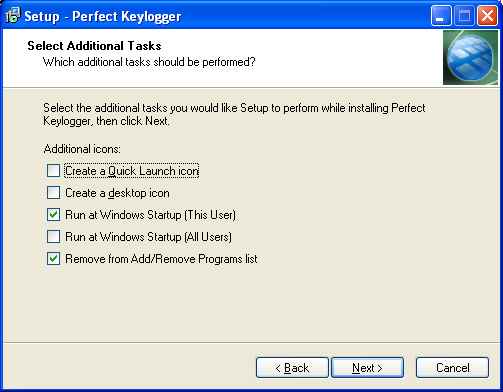
As you can see, the default Perfect Keylogger installation option is to make sure the program doesn’t appear on the Start menu. This gets over any issues that Windows Vista may have about programs that run at startup. There are also helpful instructions on making sure that the program logs information, even if people log in on a Windows Guest account.
Once you’ve installed Perfect Keylogger, it’s time to configure it. This had me slightly confused at first (but then I can be easily confused) as I’d somehow resized the window and was only given the top menu of the program, making me think that Options wasn’t working. But that was just me being dumb – resizing the window gave all the different options of what to log and how often:

This is the heart and soul of the Perfect Keylogger program.
The options you can see above are the defaults and they’re all quite sensible.
The program doesn’t automatically grab screenshots as this could slow down older systems and could also be a giveaway that the program is running if the PC is busy doing lots of things.
You can change the amount of information that is recorded by Perfect Keylogger as well as the location it’s kept in. By default, the program’s default log storage location is in a folder off its own directory but you can change this.
That said, the Perfect Keylogger log files are encrypted. Not too many people are likely to know what a line such as the one below is storing:
²°¯±±¯²°°¹ ±´º²µº³±ÝÛ×éîäï÷ ÃèáîçåäÝÛÒåáäíå¯ÈåìðÝÛ
I’ve blocked out the hot key selection in the above screen shot as when I was testing, I left it at the default and didn’t want to give anything away in this review.
The keystrokes logger logs everything. Even the typos and arrow key movements.
So you can spy on MSN Messenger chats and grab passwords if they were typed in whilst you were recording what was happening. Stored passwords don’t show up on the log, but that doesn’t really matter as you could log in using the password that had been stored on the PC.
The “programs” section shows you which programs have been launched, even down to telling you that a new tab has been opened in a browser, what was searched for and what was shown in the “title” section of the browser.
My log showed the subject line of my emails, the name of any files I’d opened or saved. Even the tool option I chose on my image grabbing program to block out the hot key shortcuts was shown.
“Websites” shows the web sites visited. Clicking on these brings the relevant website up, either in the program’s internal browser or in your default browser. The program also keeps copies of the websites viewed, so you can see them even if they wouldn’t normally be accessible – such as web based email accounts.
Optionally, log files can be emailed to you. The help file that accompanies the program explains the different settings and also what to do if your email provider doesn’t support this kind of email sending. Popular options such as Gmail are pre-set, so you won’t have to do much more than enter your email address and password.
In stealth mode – which is how you’d normally be running Perfect Keylogger – the program removes itself from the Application list that Windows offers.
Verdict
Perfect Keylogger does what it sets out to do: record anything and everything that happens on a computer, including screen snapshots if you want them.
It’s easy and intuitive to set up. Other key stroke loggers that I’ve used seem to require a degree in computing before you can set them up but Perfect Keylogger worked as promised immediately.
If you’ve got children who are left unattended on computers or employees working for you or even a spouse you don’t completely trust, then Perfect Keylogger is well worth investing in as an excellent spy tool.